Package And Class Explanations
- annotations
- This holds one file, Generated.java. This simply tells Jacoco to ignore the annotated class or method when calculating code coverage.
- constants
- This package serves to hold constant values.
- Classes/Enums
- DataPath
- Holds
String constants for file paths to data files. This allows for the paths to be referenced by an enum value, rather than needing to be hardcoded as a string wherever used. This also prevents typos, which can cause files not to be found.
- ItemSimilarityWeights
- Holds
float constants for weights used in calculating item similarity scores. Each weight corresponds to an instance variable of the Item class, and the weights are used in a weighted sum of field similarity scores to calculate an overall similarity score between two items.
- TableColumnName
- Holds
String constants for the column names of the item data table. This allows for the column names to be referenced by an enum value, rather than needing to be hardcoded as a string wherever used. This also prevents typos, which can cause columns not to be found.
- TestFXId
- Holds
String constants for the ID values of JavaFX nodes in the UI. This allows for the IDs to be referenced by an enum value, rather than needing to be hardcoded as a string wherever used. This is useful during testing to retrieve nodes from the scene.
- UIDataName
- Holds
String constants for the names of data fields that are displayed in the UI. This allows for access to search data without a full String name, preventing typos from occurring when inserting and accessing data.
- UIElementName
- Holds
String constants for the names of JavaFX nodes in the UI. This allows for the names to be referenced by an enum value, rather than needing to be hardcoded as a string wherever used. This is useful during testing. When registering nodes in the GeneralManager, this enum is used as the key for the node, which allows for retrieval of the node later by its enum value in the UIElementManager class, rather than needing to remember the exact string name used when registering the node.
- UISizeControl
- Holds
int constants for the height and width of various parts of the UI. This allows for sizes of UI elements to be calculated in reference to other sizes, enabling a more clean design. For example the width of an AttributedItemContainer is defined as the width of the image it holds, plus a small constant value. This allows for a small buffer in the container around the image, no matter the size of the image.
- URL
- Holds
String constants for some URLs used in the program. In production, the only non-deprecated URL is the one linking to the Unsplash page, as it is required by Unsplash API in order to have the license used to access the API to get image URLs. Deprecated URLs hold an old sample image and author information that were used to make a mock to get approval for the API.
- data_manipulation
- This package holds files for manipulating data. This directory includes simple .ipynb files running Java to do simple data manipulation. The directory also has a Java class
ImageUrlFiller, which was used early on in the project to fill in image URLs, author names, and author URLs for items. This was ran once Unsplash API gave a license to access the API with an acceptable rate limit for the project.
ManualDataWriter is another class in this package, which was used for manually declaring data.- No code in this package is used during main execution of the program, but they are important for understanding the data in the project and what transformations were done to it. All code here is deprecated. Code is not included in Javadoc or test coverage.
- entities
- This package is meant for simple entities, which are more or less data holders, similar to a
SpringBoot entity.
- Classes
- Item
- This class is a simple data holder for the item data. It has instance variables for each column of the item data. It also has a static method for generating a random
Item object, which is used for testing purposes. Furthermore, a method exists for calculating a similarity score between two items based on the values of their instance variables and the weights defined in the ItemSimilarityWeights class. Finally, Lombok is used to give the class a builder, and getters and setters for all instance variables. These getters and setters are not listed in the source code, but they are generated by Lombok.
- interfaces
- ItemRepo
- This interface is meant to be a repository for
Item instances, allowing access to item data via a variety of different sources. In this project, only ItemHashMap implements the method. The interface allows for possibly changing the repository implementation without changing the code used to access data. Additionally, this abstracts away unnecessary details of the ItemHashMap from classes using the repository, as the only used methods are simple getters and length methods.
- SearchedItemPanelDestinationUI
- This interface is meant to be used in tandem with an instance of
SearchedItemPanelInteractor and SearchedItemPanelSourceIU. The interface is meant to serve as a destination for item UI nodes to be sent when they are clicked on in a SearchedItemPanel.
- SearchedItemPanelSourceUI
- This interface is meant to be used in tandem with an instance of
SearchedItemPanelInteractor and SearchedItemPanelDestinationUI. The interface is meant to serve as a source for item UI nodes to be retrieved from when they are clicked on in a SearchedItemPanel.
- SearchedItemPanelInteractor
- This interface is meant to be used in tandem with an instance of
SearchedItemPanelSourceUI and SearchedItemPanelDestinationUI. The interface is meant to serve as an interactor for handling the logic of what happens when an item UI node is clicked on in a SearchedItemPanel, such as sending the item UI node to the destination UI and retrieving the item data from the source UI.
- Flow
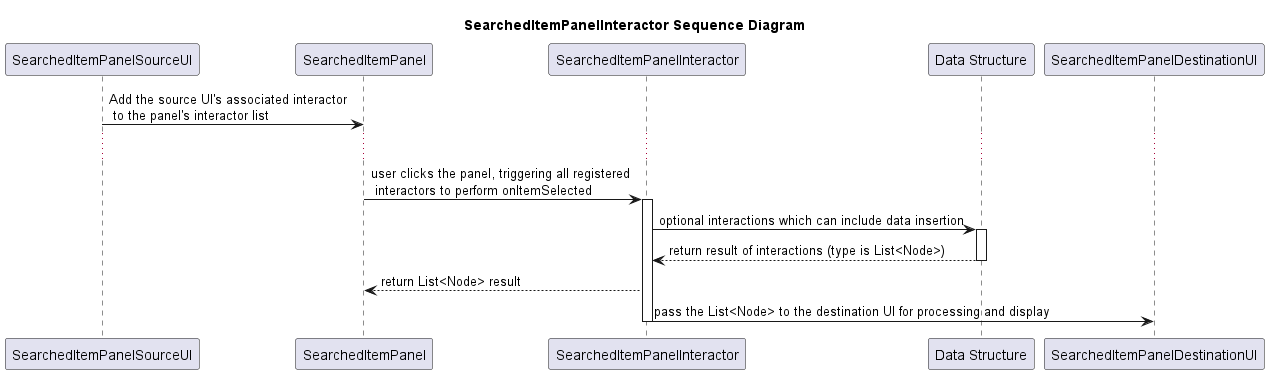
- An interactor is made with a source UI and a destination UI. The manager attaches itself to the source UI passed to it. Then, that source UI sets the
onMouseClicked event for its SearchedItemPanel instances to call all assigned interactors’ onItemSelected method. This method will then get the item ID from the source ID, retrieve a list of Node instances from a data structure, and send that list to the destination UI’s setContent method, which will then display the item in the destination UI. The flow can be seen below. Sequence Diagram
- Both Cases in Use
SimilarItemsManager connects the SearchedItemPagination as the source UI and the SimilarItemsContainer as the destination UI. When an item is clicked in the SearchedItemPagination, the interactor retrieves the similar items with the SimilarItemsGraph before sending a node of the textual data of the similar items to the SimilarItemsContainer (destination UI) to be displayed.RecentlyViewedItemsManager connects the SearchedItemPagination as the source UI and the RecentlyViewedWindow as the destination UI. When an item is clicked in the SearchedItemPagination, the interactor retrieves the inserts the item into the RecentlyViewedQueue, the queue sends back its content as a list of nodes, and the interactor sends that list to the RecentlyViewedWindow (destination UI) to be displayed.
- Managers
- This package holds classes that are meant to bridge together parts of the program and handle multiple components without having them interact.
- Classes
- GeneralManager
- This class manages most of the workflow of the program, all UI elements are registered to it, it creates the
SearchEngine, and it connects the data to the SearchEngine, Sorter, and SearchedItemPagination. Additionally, it manages the UIElementManager and creates both the SimilarItemsManager and RecentlyViewedItemsManager. Without this class, a large amount of coupling would be necessary between different components for the app to function.
- UIElementManager
- This class serves as a registry for Nodes and as an accessor to the necessary data from searching which is found in the nodes. When registering UI elements to the
GeneralManager, they are passed to the UIElementManager to be stored. Then, when the GeneralManager needs to access the data from the UI elements, UIElementManager pulls the data from the registered Nodes and returns the data to the GeneralManager.
- SimilarItemsManager
- This class manages the functionality of displaying similar items in the
SimilarItemsContainer. It serves as a bridge between the SimilarItemsGraph, which holds the similar item data, and the SimilarItemsContainer, which displays the similar items. It implements the SearchedItemPanelInteractor interface, which allows it to receive item selection events from the SearchedItemPagination and send similar item data to the SimilarItemsContainer to be displayed.
- RecentlyViewedItemsManager
- This class manages the functionality of displaying recently viewed items in the
RecentlyViewedWindow. It serves as a bridge between the RecentlyViewedQueue, which holds the recently viewed item data, and the RecentlyViewedWindow, which displays the recently viewed items. It implements the SearchedItemPanelInteractor interface, which allows it to receive item selection events from the SearchedItemPagination and send recently viewed item data to the RecentlyViewedWindow to be displayed.
- search_engine
- This package holds classes for filtering and sorting data.
- Classes
- SearchEngine
- This class is responsible for taking in search data and applying filters to the data. It is used in the
GeneralManager to apply filters to the data when a search is triggered.
- PriceFilter
- This class holds the
PriceTree data structure and provides a function for filtering data by price. It gets an array of integer indices so that it can be passed into a Selection object for easy filtering.
- QueryFilter
- This class provides a function for filtering data by a search query. It uses the BM25 algorithm to calculate a relevance score for each item based on the search query, and then filters out items whose relevance score is less than 15% of the highest relevance score. This allows for precise queries to have fewer results, while broad queries can have many results.
- Subpackages
- sorting
- This package holds classes needed to sort data.
- Classes
- Sorter
- This provides a method for sorting the data and printing the time needed to sort. It uses
InsertionSort for lists of size less than or equal to 25, and QuickSort for lists of size greater than 25. This is because InsertionSort is more efficient for small lists, while QuickSort is more efficient for larger lists. Yes, I am aware that 25 is far too small for QuickSort to be more efficient, but this demonstrates the concept of using different sorting algorithms for different sizes of data, and the time at this size is small enough to not matter.
- SortingAnalysis
- This class provides methods for analyzing the performance of the sorting algorithms. It can be used to create a table holding sort times for different algorithms. Additionally, it holds a function that tests if a table is sorted. It is deprecated as it is not used in main execution of the program. It is also excluded from test coverage and Javadoc.
- QuickSort
- This class provides a method for sorting a list of
Rows using the QuickSort algorithm.
- InsertionSort
- This class provides a method for sorting a list of
Rows using the Insertion Sort algorithm.
- LongWrapper
- This class is a simple wrapper for a
long value. It is used to allow the time taken for sorting to be recorded in the Sorter class. It is needed as the Long class is immutable, so passing by reference will not allow the value to change.
- query
- This simply holds a class used for a dummy
BM25 implementation used for testing.
- classes
- MyBM25
- This class shows a sample implementation of the BM25 algorithm based on an online source. It was used to test the functionality of the algorithm in the program prior to injecting the algorithm into main program execution. It is not part of the main program execution anymore.
- data_structures
- This package holds custom data structures used in the program.
- Classes
- PriceTree
- This class is a
TreeMap due to the Red-Black tree implementation and submap method which allow for ease of use and efficiency. Each node has a key being the price, and a value being the index in the item table the item is in. The submap method is used to get nodes within a certain price range, which can then be mapped to their values (indices) and returned as an array of integers for filtering.
- RecentlyViewedQueue
- This class is a
ArrayBlockingQueue due to the built-in functionality for a fixed size queue and the array backing. The queue holds SearchedItemPanel instances of items that are clicked on in the SearchedItemPagination. When an item is clicked on, it is added to the queue. If the queue is at capacity, the oldest item is removed to make room for the new item. If the item is already in the queue, it is plucked out, and put back at the front. The content of the queue can be retrieved as a list of Nodes to be displayed in the RecentlyViewedWindow.
- SimilarItemsGraph
- This class is used to find similar items. It stores edges as an adjacency list since the matrix is very sparse. Edges are between each item and every other item. The weight of the edge is the similarity score between the two items, which is calculated using the
Item class’s similarity method, which uses the weights defined in the ItemSimilarityWeights class. The graph runs Dijkstra’s algorithm to find the most similar items to a given item. It is used by the SimilarItemsManager to get similar items to display in the SimilarItemsContainer when an item is clicked on in the SearchedItemPagination. It uses VBox instances holding just text data instead of a full SearchedItemPanel for the similar items to save on resources, as the full panel includes the item’s image.
- SearchedItemLinkedList
- This class holds nodes which are each a
List<Item> of items. It is used by the SearchedItemPagination to hold the search results in pages of items. Each node is a page, and the list of items in the node are the items on that page. The linked list allows for easy navigation between pages, as well as easy insertion of new pages when the search results change. Item entities are stored instead of SearchedItemPanel UI nodes to save on RAM. The UI nodes are generated on the fly when a page is displayed based on the Item data in that page’s node.
- Subpackages
- item_table
- This package holds classes used for the
ItemHashMap, which is the primary storage for Item instances in the program.
- Classes
- SieveOfEratosthenes
- This class provides a method for generating a list of prime numbers up to a given limit using the Sieve of Eratosthenes algorithm. It is used in the
IdHashKey class to get a prime number under 100 million for use in the universal hash function.
- IdHashKey
- A custom key meant for the
ItemHashMap class. It is made up of the item’s ID. It uses a custom hash code based on the Rabin-Karp algorithm and universal hashing. In some cases, there are fewer buckets with collisions then Java’s built in String hash code, and in some cases there are more, it all depends on the two numbers generated by the universal hashing.
- ItemHashMap
- This class is a custom hash map for storing
Item instances. It uses the IdHashKey class as keys and Item instances as values. It is used as the primary storage for Item instances in the program, and is accessed through the ItemRepo interface to abstract away implementation details of the data structure from classes which only need to access entities.
- ui_components
- This package holds custom UI components used in the program. Many components are made up of multiple nodes, have custom functionality beyond simple UI elements, and are extending JavaFX components.
- Classes
- SearchBar
- This class is a
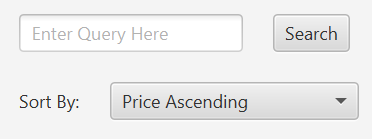
VBox for the vertical layout. It holds a text field, search button, and a sort-by selector. It allows the user to input a search query, trigger a search, and select a sort method for the search results. Methods expose the search field, the button, and the dropdown for retrieval of the search query, triggering a search, and retrieving the selected sort method for sorting later on.
- Subpackages
- filters
- This package holds custom UI components strictly meant for filtering data.
- Classes
- PriceSlider
- This class is a
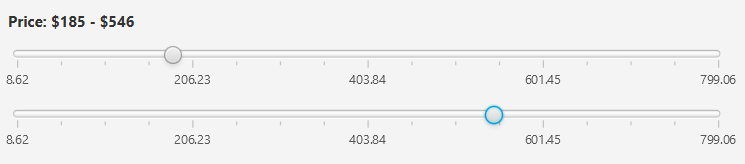
VBox for the vertical layout. It holds two sliders and a label. It enabled the user to select an initial price range, upon which the slider minimum and maximum values will be set. The label updates automatically, and methods expose the sliders to allow for retrieval of the selected price range for filtering later on.
- StarRatingFilter
- This class is a
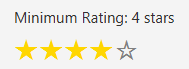
VBox for the vertical layout. It holds a simple list of stars that can be clicked on to select a minimum star rating for filtering. A method exposes the selected star rating for filtering later on.
- Subpackages
- categorical
- This package holds custom UI components strictly meant for filtering categorical data.
- Classes
- FiltersContainer
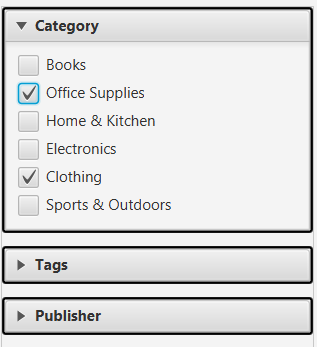
- Note: The object is the entire
VBox holding the three different sets of checkboxes.
- This class is a
ScrollPane as expanding the checkbox panels can cause the content to exceed the visible area. It holds multiple groups of checkboxes for filtering categorical data. Each group is for a different categorical variable. A method exposes the selected options as a Map<String, Set<String>> where the key is the name of the categorical variable, and the value is the set of selected options for that variable. This allows for easy retrieval of all selected categorical filter options for filtering later on.
- FilterPanel
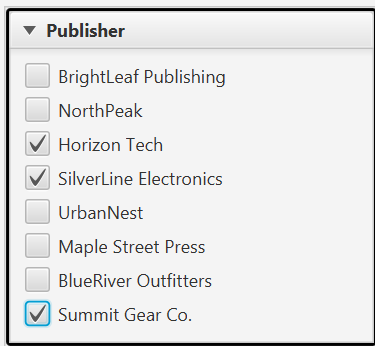
- This class is a
TitledPane to allow for the expand/collapse functionality. It holds a group of checkboxes for filtering a single categorical variable. The title of the pane is the name of the categorical variable, and the checkboxes are the options for that variable. A method exposes the selected options as a Set<String> for easy retrieval of the selected options for that variable for filtering later on.
- items
- This package holds custom UI components strictly meant for displaying item data.
- Classes
- AttributedItemContainer
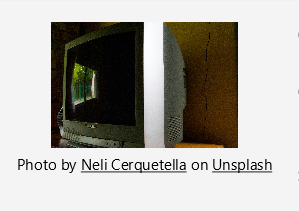
- This class is a
VBox for the vertical layout. It holds an image of the item, the author of the image, and the title of the image source. The image is linked to the image online, the author name is linked to the author’s page online, and the title is linked to the source page online. This was a requirement in order to get access to the Unsplash API, which retrieved the attribution data and URLs.
- RecentlyViewedWindow
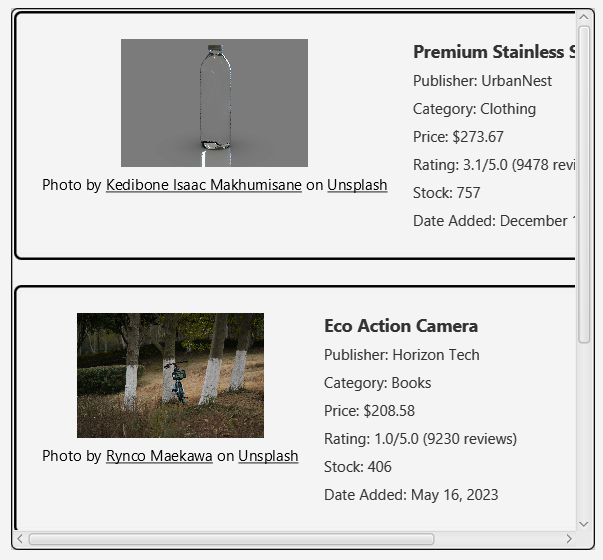
- This class is a
ScrollPane as the recently viewed items can exceed the visible area. It holds a queue of SearchedItemPanel instances of recently viewed items. When an item is clicked on in the SearchedItemPagination, it is added to the queue, and the content of the queue is displayed in this window.
- SearchedItemPanel
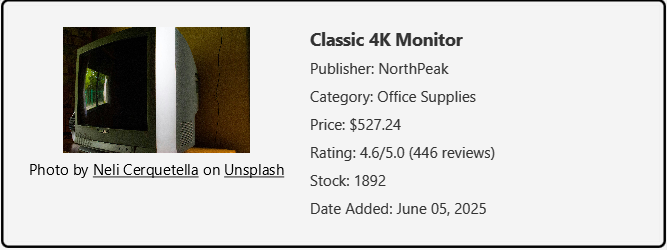
- This class is a
HBox for the horizontal layout. It holds an AttributedItemContainer for the item image and attribution data, and a VBox for the vertical layout of most other item data. This right side VBox can also be created as a standalone away from the image and attribution data. This is done to prevent rendering the image to save on RAM.
- SimilarItemsContainer
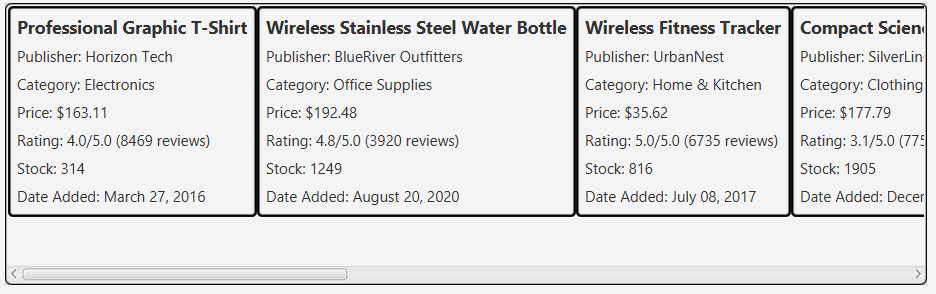
- This class is a
ScrollPane as the similar items can exceed the visible area. It holds a list of VBox instances of similar items. It gets filled by similar items when an item is clicked on in the SearchedItemPagination, which triggers the SimilarItemsManager to get similar items from the SimilarItemsGraph and send them to this container to be displayed.
- Subpackages
- searched
- This package holds custom UI components strictly meant for the search results.
SearchedItemPanel is not in this package as it is also used for recently viewed items, and similar items in a way.
- Classes
- SearchedItemPagination
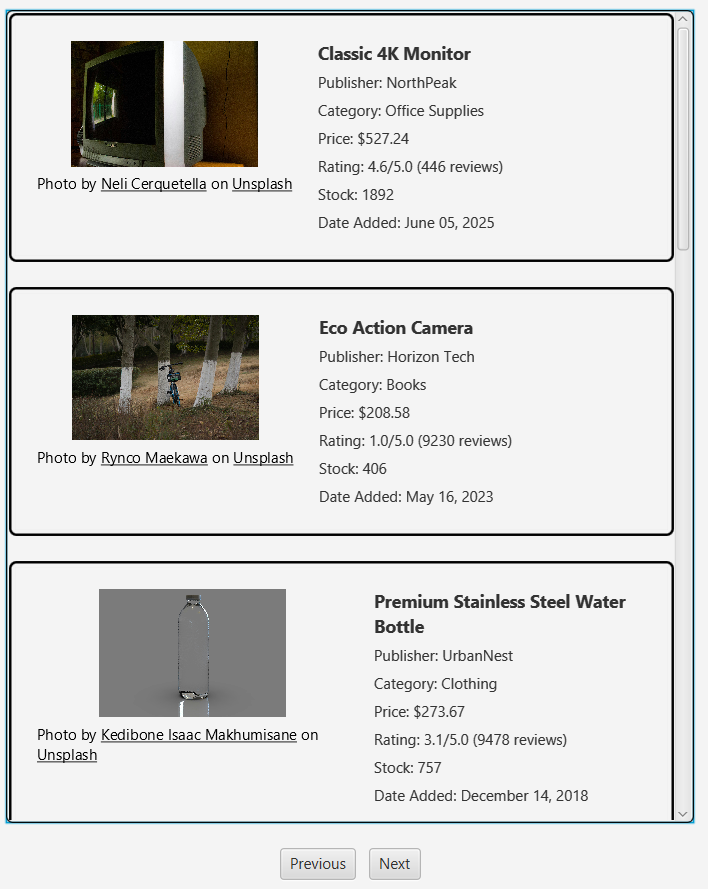
- This class is a
VBox for the vertical layout. It encompasses a SearchedItemContainer and two buttons for navigating between pages. It uses a SearchedItemLinkedList to hold the search results in pages, and sends the current page of items to the SearchedItemContainer contained to be displayed.
- SearchedItemContainer
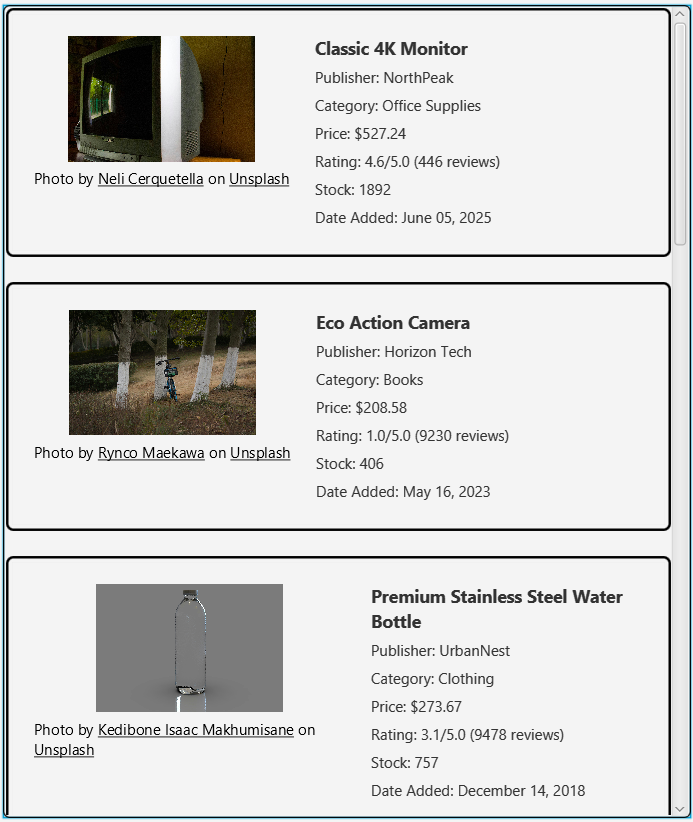
- This class is a
ScrollPane as the search results can exceed the visible area. It holds a list of SearchedItemPanel instances of search results. It gets filled by the SearchedItemPagination, which pulls the current page of items from the SearchedItemLinkedList. The UI is the same as the SearchedItemPagination except without the page navigation buttons.
- utils
- This package holds utility classes for the program. There are simple methods meant for general use.
- Classes
- TableUtils
- This class provides methods for reading in a table from CSV, writing a table to CSV, inserting an index column in a table, and converting a table to a list of
Row instances.
- UIUtils
- This class provides a method for setting the size of a JavaFX
Region based on integer values. It sets the max, min, and preferred width and height to given values. Additionally, it has a method which applies a black line border with a given corner radius and width to a JavaFX Region. This is used for styling purposes in the UI.